
Last updated: May 17, 2026
A one-second delay in your website's load time can reduce conversions by 7%. That single second is often the difference between a successful online venture and a frustrating, invisible one—a difference determined by your web hosting. To choose correct webhosting is to choose speed, security, and a solid foundation for your digital presence.
Key Takeaways
- Match Hosting to Your Needs: Your website's size, traffic, and technical requirements are the most important factors. A small blog has very different needs than a large e-commerce store.
- Understand the Main Types: The most common options are Shared, VPS, Dedicated, and Cloud hosting. Each offers a different balance of cost, performance, and control.
- Prioritize Core Features: Look for excellent uptime (99.9% or higher), fast server speeds, strong security measures (like free SSL certificates), and responsive 24/7 customer support.
- Plan for Growth: Choose a hosting plan that allows you to easily scale up your resources as your website traffic and content grow over time.
- Read the Fine Print: Pay close attention to renewal prices, which are often much higher than the introductory offer. Also, check for backup policies and resource limitations.
- Performance Matters Most: Website speed directly impacts your user experience and search engine rankings. Don't sacrifice performance for a slightly lower price.
- Don't Overlook Security: A good host provides firewalls, malware scanning, and regular security updates to protect your site from threats.
What Exactly Is Web Hosting and Why Does It Matter?
Web hosting is a service that stores your website's files (images, code, text) on a powerful computer called a server, making it accessible to visitors on the internet. Think of it as renting a plot of land on the internet where your website "lives." When someone types your domain name into their browser, the browser connects to your server, and your webpages are delivered to them.
Your choice of web host is one of the most critical decisions for your website's success. It directly affects your site's speed, security, and reliability (uptime). A poor hosting choice can lead to a slow website, frequent crashes, and security vulnerabilities, all of which drive visitors away and harm your brand's reputation. A good host, on the other hand, ensures your site is fast, safe, and always available to your audience.
What Are the Main Types of Web Hosting?
Understanding the primary types of web hosting is the first step to making an informed decision. Each type is designed for different needs, budgets, and technical skill levels. The four main categories are Shared, VPS, Dedicated, and Cloud hosting.
Here’s a breakdown of what each one offers and who it's best for.
1. Shared Hosting
Shared hosting is the most popular and affordable option, where you share a single server's resources—like memory and processing power—with hundreds or even thousands of other websites.
- Best For: Beginners, personal blogs, small business websites, and sites with low to moderate traffic.
- Pros: Very inexpensive, easy to use (often comes with a control panel), and requires no technical maintenance from the user.
- Cons: Limited resources can lead to slower performance if another site on the server gets a traffic spike. You have less control over the server environment.
- Common Mistake: Sticking with shared hosting for too long. If your site consistently runs slow or experiences downtime as it grows, it's a clear sign you need to upgrade.
2. Virtual Private Server (VPS) Hosting
VPS hosting is a step up from shared hosting. While you still share a physical server with other users, you get your own dedicated virtual partition with guaranteed resources.
- Best For: Websites that have outgrown shared hosting, small businesses experiencing growth, and users who need more control and customization.
- Pros: More stable performance than shared hosting, root access for custom software installation, and better scalability.
- Cons: Requires more technical knowledge to manage (unless you opt for a "managed" VPS plan), and it's more expensive than shared hosting.
3. Dedicated Server Hosting
With dedicated hosting, you rent an entire physical server exclusively for your website. This gives you complete control and all the server's resources to yourself.
- Best For: High-traffic websites, large e-commerce stores, agencies, and businesses that handle sensitive data and require maximum performance and security.
- Pros: Incredible performance and speed, full control over server configuration, and enhanced security.
- Cons: Very expensive, and requires a high level of technical expertise to manage, secure, and maintain.
4. Cloud Hosting
Cloud hosting uses a network of connected virtual and physical servers that work together to host a group of websites. If one server fails, others in the network pick up the slack, providing excellent reliability.
- Best For: Websites with fluctuating traffic, large-scale applications, and businesses that need high uptime and scalability.
- Pros: Extremely reliable (high uptime), easy to scale resources up or down on demand, and you typically only pay for the resources you use.
- Cons: Costs can be less predictable than fixed-price plans, and some configurations can be complex.
How Do I Choose Correct Webhosting for My Specific Needs?
To choose correct webhosting, you must align the hosting plan with your website's specific goals, traffic, and technical comfort level. There is no single "best" web host—only the one that is the right fit for you. Start by evaluating four key areas: your website type, expected traffic, budget, and technical skills.
This simple framework will help you filter out the noise and focus on the options that truly match your requirements.
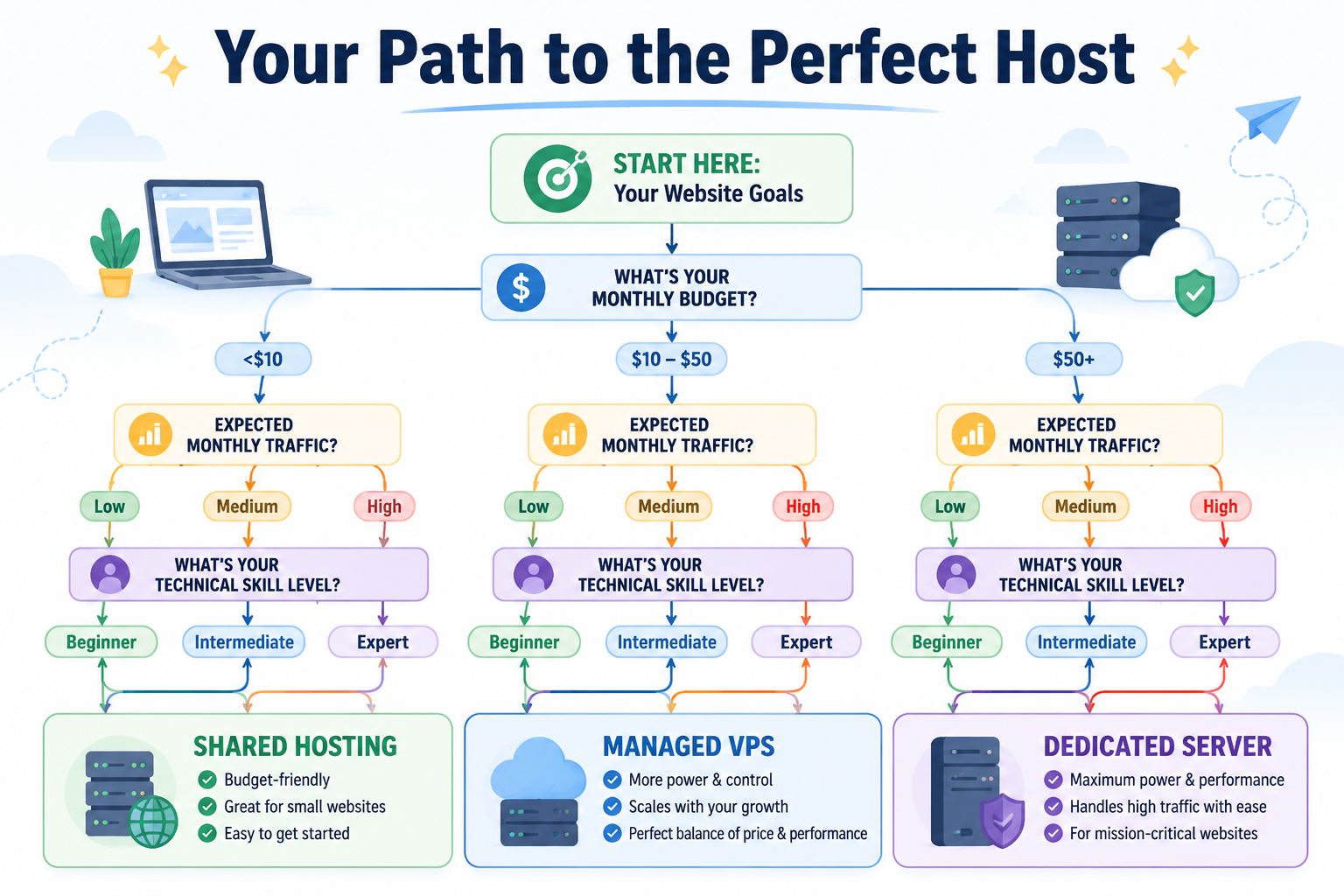
Step 1: Assess Your Website Type and Goals
What is the purpose of your website? The answer will heavily influence your hosting needs.
- Personal Blog or Portfolio: A basic shared hosting plan is usually sufficient. Your focus should be on reliability and ease of use.
- Small Business Website: A premium shared hosting plan or a low-tier VPS is a great starting point. You'll want good performance and support to ensure a professional online presence.
- E-commerce Store: A VPS or cloud hosting plan is essential. E-commerce sites require higher security, dedicated resources to handle transactions, and speed to prevent cart abandonment.
- Online Forum or Community: These sites can consume a lot of server resources. A powerful VPS or a dedicated server is necessary to handle the database-intensive operations.
Step 2: Estimate Your Traffic
Be realistic about how many visitors you expect.
- New Website (Low Traffic): If you're just starting, you'll likely have fewer than 10,000 visitors per month. Shared hosting is a perfect, cost-effective choice.
- Growing Website (Medium Traffic): If you're getting 10,000 to 50,000 visitors per month, it's time to consider a VPS. This will ensure your site remains fast as your audience grows.
- Established Website (High Traffic): For sites with over 50,000 monthly visitors, a robust VPS, dedicated server, or cloud hosting plan is necessary to maintain performance and uptime.
Step 3: Determine Your Budget
Hosting prices vary dramatically.
- Tight Budget ($2-$10/month): Shared hosting is your best bet. Look for providers with good introductory offers but be mindful of their renewal rates.
- Moderate Budget ($20-$60/month): This range opens up the world of managed VPS hosting, offering a great balance of performance and support without the need for advanced technical skills.
- Flexible Budget ($100+/month): With this budget, you can afford a powerful dedicated server or a scalable cloud hosting solution, providing top-tier performance and reliability.
Step 4: Evaluate Your Technical Comfort Level
How comfortable are you with server management?
- Beginner: Choose a plan with a user-friendly control panel (like cPanel) and strong 24/7 customer support. Managed hosting (where the provider handles all technical maintenance) is ideal.
- Intermediate: You might be comfortable with an unmanaged VPS where you can install custom software but still rely on the host for core maintenance.
- Expert: If you're a developer or system administrator, an unmanaged dedicated server or a complex cloud configuration gives you the complete freedom you need.
What Key Features Should I Look For in a Hosting Provider?
Beyond the hosting type, you need to evaluate the specific features offered by a provider. These details separate a great host from a mediocre one and directly impact your daily experience and your website's performance.
Look for a provider that excels in these five areas:
-
Uptime and Reliability: Uptime is the percentage of time your website is online and available to visitors. Look for a host that guarantees at least 99.9% uptime. Anything less is unacceptable in 2026. Some providers even offer a "service level agreement" (SLA) that credits your account if they fail to meet this guarantee.
-
Speed and Performance: Site speed is crucial for both user experience and SEO. A fast host uses modern hardware, like Solid-State Drives (SSDs), which are significantly faster than traditional hard drives. They should also have up-to-date software and a well-configured network. Look for features like built-in caching and access to a Content Delivery Network (CDN), which can dramatically improve your global load times.
-
Security: A secure host is non-negotiable. Essential security features include:
- Free SSL Certificate: This encrypts data between your site and your visitors, which is vital for trust and SEO.
- Web Application Firewall (WAF): Helps block malicious traffic before it reaches your site.
- Malware Scanning and Removal: Regular scans to detect and remove harmful code.
- DDoS Protection: Protects your site from being overwhelmed by malicious traffic attacks.
-
Customer Support: When something goes wrong, you need fast, helpful support. The best hosts offer 24/7/365 support through multiple channels, including live chat, phone, and email. Test their support before you buy. Ask them a few pre-sales questions to gauge their responsiveness and knowledge.
-
Scalability and Backups: Your website should be able to grow. A good host makes it easy to upgrade your plan or add more resources without downtime. Additionally, check their backup policy. They should offer automatic, regular backups of your website and make it easy for you to restore a previous version if needed.
What Are Common Mistakes to Avoid When You Choose Correct Webhosting?
Choosing the right web host is as much about avoiding common pitfalls as it is about finding the right features. Many people make simple, preventable mistakes that lead to frustration, wasted money, and poor website performance.
Being aware of these common errors will help you make a much better decision.
- Mistake #1: Choosing Based on Price Alone. The cheapest option is rarely the best. Ultra-low-cost hosts often compromise on performance, security, and support. A slow or offline website will cost you far more in lost visitors and revenue than you'd save on a cheap plan.
- Mistake #2: Ignoring Renewal Rates. Many hosts lure new customers with incredibly low introductory prices that skyrocket upon renewal. Always check the regular price before you sign up. A host that costs $2.95/month for the first year might renew at $10.95/month, a significant long-term increase.
- Mistake #3: Underestimating the Importance of Support. Don't assume you'll never need help. When your website is down at 2 AM, the quality of your host's support team becomes the most important feature. A host with poor, slow, or unhelpful support is a liability.
- Mistake #4: Not Planning for Future Growth. The hosting plan that works for you today might not work in a year. If you choose a host with no clear upgrade path, you could face a complicated and disruptive website migration down the road. Always pick a provider that offers a range of services you can grow into.
- Mistake #5: Overlooking Backup Policies. Never assume your host is taking care of backups for you. Some cheap plans don't include automatic backups, or they charge a hefty fee to restore your site from one. Verify that automatic, easy-to-access backups are part of your plan.
Conclusion
To choose correct webhosting in 2026 is to invest in the foundation of your online success. It’s about more than just finding a place for your files to live; it's about ensuring your website is fast, secure, and reliably available to your audience. By understanding the different hosting types and carefully assessing your own needs regarding traffic, budget, and technical skill, you can confidently select a provider that will support your goals now and in the future.
Your next steps are simple:
- Define Your Needs: Write down your website type, expected traffic, and monthly budget.
- Shortlist 2-3 Providers: Based on your needs, find a few reputable hosts that offer the right type of hosting (Shared, VPS, etc.).
- Compare Key Features: Evaluate your shortlisted hosts on uptime, speed (SSD storage), security (free SSL), and 24/7 support.
- Make Your Choice: Sign up for the plan that best aligns with your checklist. Don't be afraid to start small—you can always upgrade as you grow.
Frequently Asked Questions (FAQ)
Can I switch web hosts later?
Yes, you can always migrate your website to a new host. Many hosting providers even offer free migration services to make the process easier for new customers.
What's the difference between a domain name and web hosting?
A domain name is your website's address (e.g., www.example.com), while web hosting is the space you rent on a server to store your website's files. You need both to have a functioning website.
Do I need a dedicated IP address?
Most websites on shared hosting do not need a dedicated IP address. A free SSL certificate, which is essential for security, can now be installed without one. You might need one for specific advanced applications or a private business network.
How important is the server location?
It's best to choose a host with a server location geographically close to the majority of your visitors. This can reduce latency and improve your website's loading speed for your target audience.
What is a CDN and do I need one?
A CDN (Content Delivery Network) is a network of servers distributed around the world. It stores copies of your website's static content (like images) and serves them to visitors from the server closest to them, which dramatically speeds up your site. Many hosts now include a free CDN with their plans.
Is free web hosting a good idea?
Free web hosting is generally not recommended for any serious project. It often comes with slow performance, forced ads on your site, very limited resources, poor security, and no customer support. It's only suitable for temporary experiments or learning purposes.